Device Lock Controller: How It Works and Why Lenders Use It
A practical guide to device locking for smartphone financing, from how DLC works on Android and how it compares with MDM locks to the lender workflow and responsible-use practices.
·
11 min read
·
RocketPay Editorial

TL;DR
A Device Lock Controller (DLC) is an Android system component that lets a lender restrict a financed phone after missed payments and release it when the loan is repaid, while emergency calls stay available. Because it runs at the operating-system level, it is harder for a borrower to remove than an app-based MDM lock, though MDM still covers older phones and brands outside DLC. In India, regulated lenders must follow new device-locking directions from 1 January 2027, and responsible use depends on clear consent, gradual escalation, fair recovery practices and uninterrupted emergency access.
Smartphone financing is now mainstream in India. Counterpoint Research expects financing through NBFC loans and card EMIs to account for 42% of smartphone sales in India in 2026, with NBFC loans averaging 10 months in Q2 2026. The weakness is the collateral: unlike a car or a house, a financed phone has been hard to track and impractical to repossess once it leaves the shop.
The economics of recovery add to the problem. Instalments are spread over about 10 months, so each EMI is small, and a field visit that fails to collect can cost a meaningful share of the amount it was sent to recover.
In Tier 2 cities, EMI accounted for 57.5% of smartphone purchases in Q2 2026, according to the same Counterpoint report. As a result, lenders and retailers often decline creditworthy new-to-credit (NTC) and gig-economy applicants. Device locking for financed phones, usually through a device lock controller (DLC) or an MDM app, ties the handset itself to the repayment schedule.
What Is a Device Lock Controller (DLC)?
A Device Lock Controller (DLC) is a system-level Android component that allows authorised credit providers to remotely manage and restrict a financed smartphone when agreed repayments are missed. When a device is locked, only a limited set of essential functions remains available, such as emergency calling and access to settings. For regulated lenders in India, incoming calls and SMS must also keep working.
In practice, a DLC connects the lender's loan system to the device. The loan system knows what is owed, and the DLC applies that information on the handset through reminders, a grace period and, if needed, a lock until payment is made.
The Technology Behind DLC: What It Is, Who Built It and How It Developed
Origins: A Kenyan Financing Program in 2020
DLC was developed by Google. In 2020, Google quietly published a "Device Lock Controller" app to the Play Store, giving credit providers a way to limit the functionality of a financed phone if payments are missed. Google said Kenyan carrier Safaricom had used it since July 2020 for "Lipa Mdogo Mdogo" ("Pay Bit by Bit"), a plan to buy an Android Go Edition phone in instalments, as 9 to 5 Google reported in November 2020.
Safaricom's own plan set a fast schedule: the phone was locked on the fourth day after a missed deadline, and outgoing calls and SMS were barred from the seventh day. A regulated lender in India could not run that schedule from 1 January 2027, when restrictions may begin only at 30 days past due.
Built on Enterprise Device Management APIs
The early app relied on Android's DeviceAdminService API, the same API enterprises use to control what employees can do with their work phones. Because apps of this type are typically preloaded, they are not easy for a user to disable.
From a Single App to a Financing Platform
The current design is part of Android itself. Android's developer reference for DeviceLockManager describes a system service that special "kiosk apps", installed by the device lock solution, use to lock and unlock a financed phone. While the phone is locked, only a limited set of actions, such as emergency calls, is allowed. Android 14 added a Device Policy Resolution Framework that decides which management agent wins when two set the same policy. For the lock task settings that keep a phone on its payment screen, the device lock admin ranks above an enterprise admin.
Scaling Through Partners
Trustonic announced in July 2025 that Google had approved it as a global partner to deploy DLC worldwide. The company says it had worked with Google on DLC for the previous three years, and that handset manufacturers enable DLC on smartphones running Android 15 and later.
What Is MDM?
MDM (Mobile Device Management) is software that lets an organization remotely configure, monitor and restrict mobile devices. It was built for enterprises managing company phones, and on Android it typically runs as a device policy controller app. Some lenders apply the same approach to financed phones, using an MDM agent to restrict features when an EMI is missed. Because an MDM agent can use Android's device-admin permissions or Android Enterprise management, it can run on phones that lack the system-level device lock service.
DLC Lock vs. MDM Lock
Factor | DLC lock | MDM lock |
|---|---|---|
What it is | System-level device lock framework built for device financing | General-purpose mobile device management applied to financed phones |
Where it operates | Integrated with the Android system layer | Runs as a managed app using device-admin or Android Enterprise permissions |
Developed by | Built into Android for financed devices | Independent software vendors; MDM itself was designed for enterprise device control |
Original purpose | Lock and unlock devices on a financing agreement | Manage and secure corporate devices and apps |
Android versions | Takes policy precedence from Android 14; embedded by manufacturers on devices running Android 15 and later | Works across a wide range of Android versions, including older ones. |
Policy precedence | On Android 14 and later, outranks the enterprise admin on lock task policies; other policies follow a strictest-wins rule. | Follows the same strictest-wins rules; ranks below the device lock role on lock task policies. |
Provisioning | Phone registered by IMEI with the device lock backend. | Usually QR, zero-touch or manual app installation |
Resistance to tampering | Designed to hold through resets and removal attempts; depends on implementation | Varies by vendor and setup |
Typical fit | Lenders who want OS-level enforcement for financed devices | Lenders who need wide device coverage or are running smaller programs |
Financing smartphones and need a DLC-based lock?
RocketPay supplies DLC-based locking through an API or an Android app.
How a Device Lock Controller Works on Android Devices
Lenders lock financed Android phones through two technologies: DLC and MDM. Each works differently, so it helps to look at them separately.
Locking Through DLC
How it works
Enrollment. The device checks in with the device lock backend, goes through a provisioning flow and installs a kiosk app, after which the device is "restricted" and the creditor's kiosk app is able to lock it.
Lock and unlock. The kiosk app locks the device when payments are missed and unlocks it once they resume. This runs through the DeviceLockManager system service.
Policy precedence. On Android 14 and later, the DLC layer overrides a standard enterprise DPC, so other device policies cannot override a financing lock.
Android versions. DLC support is strongest on newer devices, with manufacturers embedding it in phones running Android 15 and beyond.
Release. Once the device is fully paid off, the kiosk app relinquishes its ability to lock the device.
How it helps the lender
The lock sits in the system layer, not in an app that sits on top of it.
It was built for financed devices, so its lock, unlock and release flow matches the loan lifecycle.
Manufacturer support is growing, though it is checked model by model.
Locking Through MDM
How it works
Enrollment. An MDM agent app is installed on the handset, usually by QR scan, zero-touch setup or manual installation, and is granted device-admin or Android Enterprise permissions.
Lock and unlock. On default, the agent applies restrictions such as limiting apps or showing a payment screen. It lifts them once payment is confirmed.
Android versions. Because it relies on the device-admin and Android Enterprise frameworks, it can run on a wide range of Android versions, including older ones.
How it helps the lender
It works on many Android phones, even those running older Android versions.
It has a lower barrier to entry, which suits smaller programs.
Where it falls short
The agent runs as an app, so enforcement depends on it staying provisioned and uninterrupted.
Some vendors note that a factory reset can remove an MDM agent until the phone reconnects and the agent reinstalls through zero-touch enrollment, which is why MDM setups usually also disable USB debugging and developer options.
Why DLC Is the Preferred Choice
DLC is the more reliable option for lenders who need enforcement they can depend on. It operates at the system level instead of as an app, it was designed specifically for device financing, and on Android 14 and later it takes precedence over standard device policies. MDM was built for enterprise device control, so its lock depends on an app that the rest of the system can affect. MDM remains a workable choice where DLC is not available on a particular device or Android version, but where DLC is supported, it is the stronger basis for a lock.
How Lenders Enrol, Lock and Release a Financed Phone
Step 1: Point-of-sale activation. The retailer or sales agent enrolls the device by QR scan or zero-touch flow. The borrower's explicit digital consent is captured on-screen.
Step 2: Sync with the lender's systems. The device is linked to the loan management system (LMS) through APIs and webhooks, so repayment dates and device status stay aligned.
Step 3: Reminders. The borrower gets reminders before the EMI due date and payment prompts on the phone.
Step 4: Grace period. The lender sets a grace window, before any restriction applies.
Step 5: Lock on default and unlock on payment. If the EMI remains unpaid, non-essential apps are restricted and a payment screen appears. Once payment is verified, the lender's system sends an unlock command and the device returns to normal use.
What Borrowers Experience When a Device Is Locked
A locked device remains usable for essential purposes. The borrower sees a settlement screen showing the overdue amount, the due date and a way to pay.
Entertainment, social media, games and camera tools are temporarily restricted. Safety functions stay available:
Emergency calling remains enabled
Essential incoming calls are preserved
Settings access stays open so the borrower can connect to Wi-Fi or mobile data and pay
Benefits for Fintechs Financing Smartphones
Repayment discipline. Borrowers who know a device is tied to the repayment schedule tend to prioritize payments, which can reduce delinquency.
Lower recovery cost. Less reliance on field agents, call-center dialing and legal notices can reduce the cost of collection.
Reduced resale risk. A locked financed handset has limited resale value, which discourages borrowers from selling or pawning it.
Wider access to credit. Lenders can consider NTC and gig-economy customers who lack salary slips or established credit scores, with a recovery option in place.
Consumer Concerns and Regulatory Guardrails
Device locking depends on borrower trust and regulatory acceptance. Using India as the reference market, responsible deployments typically rest on four points:
Explicit, unbundled consent. Under India's Digital Personal Data Protection Act, 2023, borrowers should clearly understand and agree to device management terms through a plain consent screen at onboarding.
Fair recovery practices. Alignment with RBI digital lending guidelines and fair practices expectations means no harassment, no surprise actions and transparent loan accounting.
Data privacy boundaries. The locking software should not access personal photos, messages, contacts or browsing history.
Emergency access. Emergency voice services and core connectivity must remain available at all times.
Rules differ across APAC markets and continue to evolve. Lenders should have their specific rollout reviewed by local legal and compliance teams.
Device Lock Controller vs. Traditional Recovery Methods
Factor | Traditional recovery | Device Lock Controller |
|---|---|---|
Speed to action | Days of calls and field dispatch | Applied after the grace period ends |
Cost per case | Field visit and agent cost per case | Lower, automated cost |
Customer experience | Calls and home visits | Private, on-screen settlement |
Compliance exposure | Depends on individual agent conduct | Rules applied consistently by software |
Best Practices for Using Device Lock Controllers Ethically
Disclose at the point of sale. Explain the lock terms clearly before the sale is finalized.
Escalate gradually. Use reminders and grace periods before any lock.
Unlock promptly. Payment confirmation should trigger an unlock at any hour, so no customer stays locked after paying.
Offer a dispute channel. Provide a simple support option on the locked screen.
Deprovision at loan closure. Remove the management profile and restore full, unrestricted ownership once the final EMI is cleared.
Conclusion
Device locking gives lenders a recovery option that does not depend on field visits. Of the two technologies in use, DLC offers the more dependable basis for a lock, because it is a system-level framework designed for financed devices. Whichever approach a lender chooses, transparent consent, fair recovery practices and a respectful borrower experience remain central to using it responsibly.
Where to Source DLC-Based Locking for Device Financing
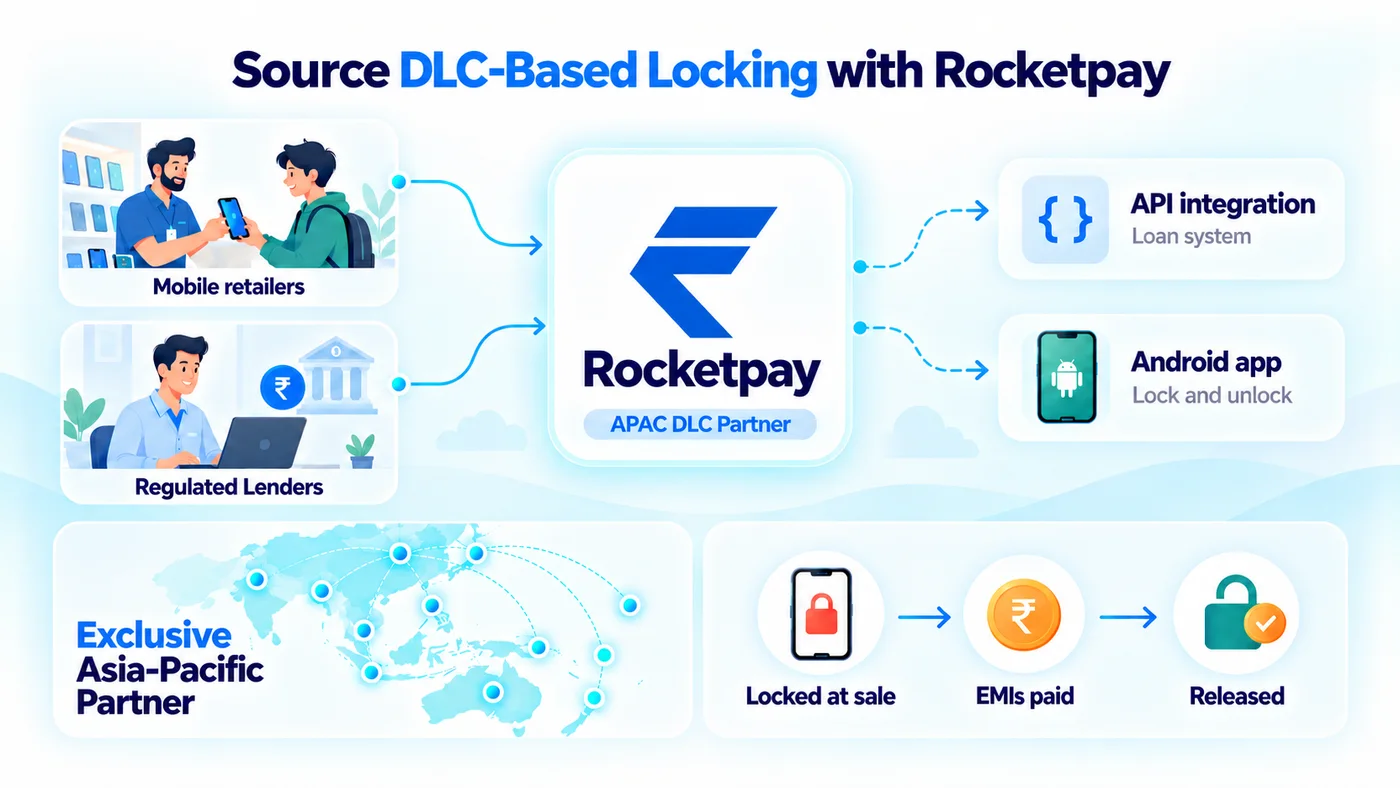
RocketPay is an APAC exclusive partner of DLC-based locking systems, supplying lenders and mobile retailers that finance smartphones. RocketPay provides DLC for multiple Android smartphone brands, and offers this solution in India, Philippines, Thailand, Sri Lanka, Nepal, Vietnam, Indonesia, Japan, Korea, Australia and other APAC countries. Financiers can lock and unlock financed devices through an API integration with their loan management system or through RocketPay’s Android app, and the lock is applied at the time of sale and released once the dues are cleared. If you finance smartphones and want to add DLC-based locking to your recovery process, you can speak to the RocketPay team about what the setup would involve for your market and portfolio.
Key Takeaways
DLC is a system-level Android framework, built by Google, that lets lenders remotely restrict a financed phone when EMIs are missed.
MDM locks run as apps and reach older Android versions, but DLC is more reliable because it is system-level and built for financing.
Lenders use it for lower recovery costs, better repayment discipline, reduced resale risk and wider credit access.
The workflow is: enrol at the point of sale with consent, sync with the loan system, remind, allow a grace period, then lock on default and unlock once payment is verified. A locked phone still allows emergency calls and settings access.
Responsible use means clear consent, gradual escalation, fair recovery and a dispute channel. In India this includes the DPDP Act 2023, RBI digital lending guidelines and the RBI directions effective 1 January 2027.
Add DLC-based locking to your phone financing.
RocketPay supplies DLC-based locking for lenders and mobile retailers, integrated through an API or an Android app.
Book a Demo →
Frequently asked questions
What does a Device Lock Controller do?
It links a financed smartphone to the lender's loan system. It supports payment reminders and, if an EMI is missed beyond the grace period, temporarily restricts apps and general phone features while showing a payment screen. Once payment is confirmed, the device is unlocked.
Who developed the Device Lock Controller?
Google developed DLC. Its first public use was in a 2020 financing program in Kenya, and it has since developed into a system-level capability within Android.
What is the difference between a DLC lock and an MDM lock?
A DLC lock is a system-level framework built for financed devices, with policy precedence from Android 14 and manufacturer-embedded support on Android 15 and later. An MDM lock uses enterprise device management software, running as an app on the phone, and can cover a wider range of Android versions, including older ones. DLC is generally the more reliable of the two.
Is using a Device Lock Controller legal?
In India, yes for regulated lenders, within limits. Amended RBI directions issued on 6 August 2026 and effective 1 January 2027 allow a lender to restrict a phone only when its loan financed that phone, the agreement permits it, and the loan is at least 30 days past due after notice. Incoming calls, SMS and emergency SOS must keep working, and the lock must lift within one hour of payment.
Can a locked phone still make emergency calls?
Yes. Emergency calling remains available from the locked screen, and essential incoming calls and network settings stay accessible so the borrower can reconnect and pay.
Does the borrower need to install anything?
No. With DLC, the lock is a system component, not a downloaded app. The retailer or lender registers the phone at the point of sale (with RocketPay, by entering the IMEI in the app), and enrollment completes before the handset is handed over.
What happens to the device once the loan is repaid?
After the final instalment is cleared, the lender releases the device. The management profile and restrictions are removed, and the customer has full ownership of an unrestricted phone.
Can a borrower factory reset the phone to remove the lock?
With RocketPay's DLC-based lock, no. After a reset or a service-centre software flash, the lock reactivates as soon as the phone reconnects to the internet. RocketPay's AI-based offline lock adds a second safeguard: if a phone stays offline for 72 hours, it locks itself automatically, with no SMS or internet trigger, so staying offline does not avoid the lock. When the phone reconnects, it syncs and the lender has control again. Other implementations vary by brand and model.
